> ## Documentation Index
> Fetch the complete documentation index at: https://cometchat-22654f5b-docs-new-flutter-push-notifications.mintlify.site/llms.txt
> Use this file to discover all available pages before exploring further.
# iOS
> Add CometChat push notifications and VoIP calls to an iOS app with the drop-in CometChatPushNotifications SDK.
## What this guide covers
* Adding the `CometChatPushNotifications` SDK and initializing it.
* Wiring `AppDelegate` to forward APNs callbacks to the SDK and register for VoIP pushes.
* Letting the SDK handle APNs alerts (foreground presentation, taps, quick reply, badge) and the full incoming-call experience via PushKit + CallKit.
* Handling notification taps and presenting the ongoing call screen via the delegate.
* Suppressing notifications for the chat that is currently open, clearing the badge on resume, and telling the SDK when the Calls stack is ready.
* Testing and troubleshooting.
The `CometChatPushNotifications` SDK replaces the previous approach of copying `CometChatAPNsHelper.swift`, `CometChatPNHelper.swift`, and the `AppDelegate+PN` / `AppDelegate+VoIP` extensions from the UI Kit sample. APNs token registration, foreground presentation, tap-to-open, quick reply, badge management, delivery / campaign engagement receipts, and the full PushKit + CallKit incoming-call flow are all handled inside the SDK.
## How it works
* **APNs is the transport:** Apple issues the APNs device token (chat alerts) and the PushKit VoIP token (calls) — no FCM bridge is involved.
* **CometChat's role:** The **APNs Device** and **APNs VoIP** providers you add in the dashboard hold your `.p8` key. The SDK registers both tokens with CometChat automatically after login, so CometChat can route pushes on your behalf.
* **The SDK's role:** `CometChatPushNotifications` retrieves the tokens, registers them with CometChat, parses payloads, decides chat vs. call, presents CallKit for VoIP pushes, and calls back into your `CometChatPushNotificationsDelegate` for navigation and to present the ongoing call screen.
* **Cold-start VoIP:** when the app is killed and a VoIP push arrives, PushKit wakes the app and the SDK presents the CallKit screen natively before any UI is built. On accept, `presentCallScreen(for:sessionId:)` fires once your `notifyCallsSDKReady()` has run.
## Prerequisites
* The APNs Device provider, APNs VoIP provider, and `.p8` setup from **[Getting Started](/notifications/push-getting-started)** (this guide assumes those are done).
* The CometChat **Chat SDK / UI Kit** already integrated (you call `CometChatUIKit.init()` / `login()` yourself).
* **Xcode 15+**, **iOS 15.1+** deployment target, **Swift 5.9+**.
* **CometChatSDK ≥ 4.1.5** and **CometChatCallsSDK ≥ 5.0.0** (SPM users must add these packages explicitly — see below).
* A physical device — APNs, PushKit, and CallKit do not work on the simulator.
**Complete the [Getting Started](/notifications/push-getting-started) guide first** — enable Push Notifications, add your **APNs Device** and **APNs VoIP** providers, and finish the Apple / Xcode setup (`.p8` key + capabilities). This guide covers only the iOS app wiring.
## 1. Add the dependency
In Xcode, go to **File → Add Package Dependencies…** and add:
```
https://github.com/cometchat/push-notifications-sdk-ios.git
```
Add the product **`CometChatPushNotificationsSwift`** to your app target.
SPM does not resolve transitive dependencies for prebuilt xcframeworks. You **must** also add these two packages to your project or the build fails with `Unable to resolve module dependency`:
| Package | Minimum version | Product |
| ------------------------------------------------ | --------------- | ------------------- |
| `https://github.com/cometchat/chat-sdk-ios.git` | **4.1.5** | `CometChatSDK` |
| `https://github.com/cometchat/calls-sdk-ios.git` | **5.0.0** | `CometChatCallsSDK` |
```ruby Podfile theme={null}
platform :ios, '15.1'
target 'YourApp' do
use_frameworks!
pod 'CometChatPushNotifications', '1.0.0'
end
```
CocoaPods resolves `CometChatSDK` and `CometChatCallsSDK` for you.
```bash theme={null}
pod install
```
Open the generated `.xcworkspace` from here on.
## 2. Configure the app target
1. **Signing & Capabilities → + Capability** — add **Push Notifications** and **Background Modes**. Under Background Modes tick **Remote notifications**, **Voice over IP**, and **Audio, AirPlay, and Picture in Picture** (needed while a call is active).
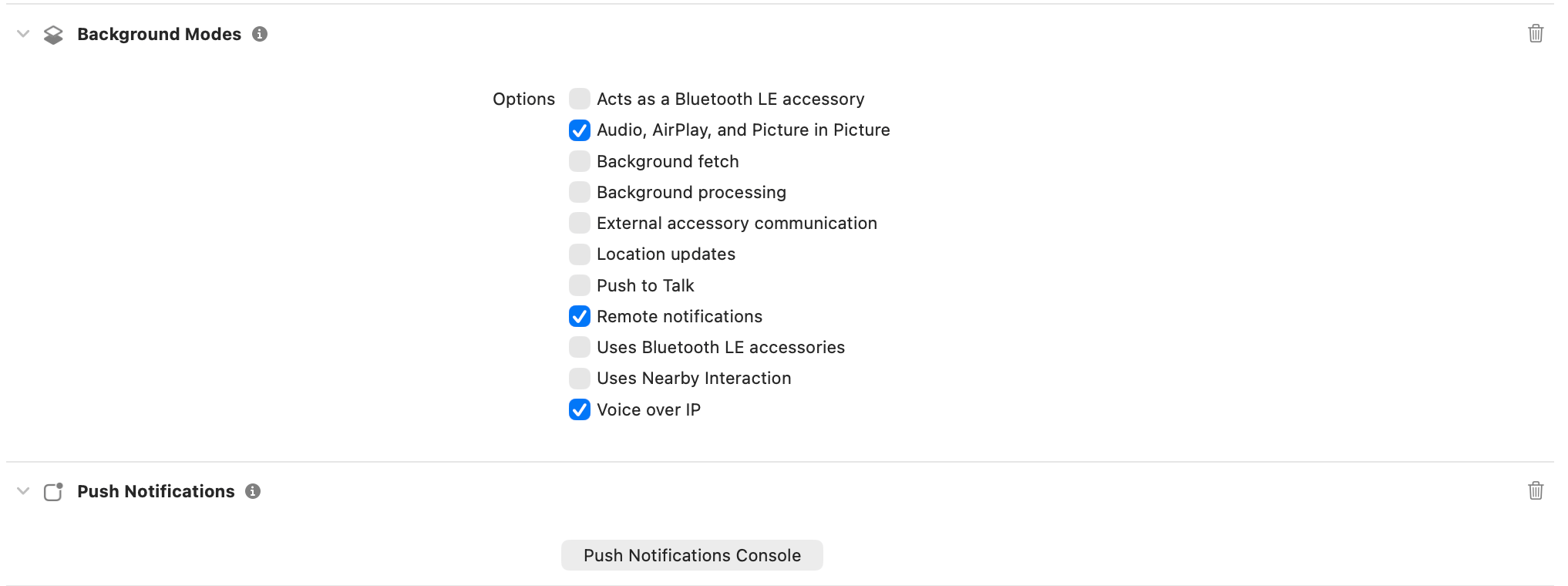 2. **Entitlements** — Push Notifications adds `aps-environment` for you (`development` for debug builds, `production` for release).
3. **Info.plist** — add microphone and camera usage strings so CallKit can request them, and confirm the background modes are present:
```xml theme={null}
NSMicrophoneUsageDescription
Required for voice and video calls.
NSCameraUsageDescription
Required for video calls.
UIBackgroundModes
remote-notification
voip
audio
```
4. In the CometChat dashboard, keep the **Bundle ID** on your APNs providers in sync with your Xcode target's bundle ID.
## 3. Store your credentials
Keep the values from Getting Started where your app can read them. The provider ID here is the **APNs Device** provider — the SDK also registers the VoIP token against the same provider automatically:
```swift AppConstants.swift theme={null}
enum AppConstants {
static let APP_ID = "YOUR_APP_ID"
static let REGION = "YOUR_REGION"
static let AUTH_KEY = "YOUR_AUTH_KEY"
static let PROVIDER_ID = "APNS-PROVIDER-ID"
}
```
## 4. Initialize the SDK in `AppDelegate`
Initialize the SDK in `application(_:didFinishLaunchingWithOptions:)`, set yourself as the delegate, register for VoIP pushes, and forward the three APNs `UIApplicationDelegate` callbacks. The SDK cannot intercept these callbacks itself — you must forward them:
```swift AppDelegate.swift theme={null}
import UIKit
import CometChatSDK
import CometChatUIKitSwift
import CometChatPushNotificationsSwift
#if canImport(CometChatCallsSDK)
import CometChatCallsSDK
#endif
@main
class AppDelegate: UIResponder, UIApplicationDelegate {
func application(_ application: UIApplication,
didFinishLaunchingWithOptions launchOptions: [UIApplication.LaunchOptionsKey: Any]?) -> Bool {
// Your existing CometChat UI Kit / Chat SDK initialization runs elsewhere
// (typically in SceneDelegate) — the push SDK does not need to run before it.
let config = CometChatPushNotificationsConfig(
providerId: AppConstants.PROVIDER_ID,
enableBadgeCount: true,
showInAppNotifications: true,
foregroundCallPresentation: .callKit // native CallKit UI, foreground included
)
CometChatPushNotifications.shared.initialize(config: config)
CometChatPushNotifications.shared.delegate = self
CometChatPushNotifications.shared.registerForVoIPPushes()
return true
}
// MARK: - APNs callbacks (forward all three to the SDK)
func application(_ application: UIApplication,
didRegisterForRemoteNotificationsWithDeviceToken deviceToken: Data) {
CometChatPushNotifications.shared.registerDeviceToken(deviceToken)
}
func application(_ application: UIApplication,
didFailToRegisterForRemoteNotificationsWithError error: Error) {
CometChatPushNotifications.shared.handleRegistrationFailure(error)
}
func application(_ application: UIApplication,
didReceiveRemoteNotification userInfo: [AnyHashable: Any],
fetchCompletionHandler completionHandler: @escaping (UIBackgroundFetchResult) -> Void) {
CometChatPushNotifications.shared.handleBackgroundNotification(userInfo: userInfo)
completionHandler(.newData)
}
}
```
`CometChatPushNotificationsConfig` accepts:
| Field | Default | Purpose |
| ---------------------------- | ---------- | ----------------------------------------------------------------------------------------------------------------------------------------------------------------------------------------- |
| `providerId` | required | The **APNs Device** provider ID from your dashboard. |
| `enableBadgeCount` | `false` | Set the app icon badge from the payload's `unreadMessageCount`. Pair with `clearBadgeCount()` on `sceneDidBecomeActive`. |
| `showInAppNotifications` | `false` | Show a banner for chat pushes while the app is in the foreground. Suppressed automatically for the currently open chat (see step 6). |
| `foregroundCallPresentation` | `.callKit` | How to render an incoming VoIP call that arrives in the foreground. `.callKit` uses the native iOS call screen; use your custom UI only if you disable the UI Kit's in-app incoming call. |
Token registration and rotation are handled automatically. After a successful `CometChat.login(...)`, the SDK binds the stored APNs and VoIP tokens to the user, and it re-registers them if either token changes. You do **not** need to call any `registerToken` API yourself.
## 5. Wire `SceneDelegate` — notify Calls SDK and clear badge
Call `notifyCallsSDKReady()` **after** `CometChatUIKit.init(...)` succeeds so the SDK can present any incoming call that arrived during a cold start. Clear the badge every time the scene becomes active. Also disable the UI Kit's in-app incoming call so CallKit is not doubled up:
```swift SceneDelegate.swift theme={null}
import UIKit
import CometChatUIKitSwift
import CometChatSDK
import CometChatPushNotificationsSwift
class SceneDelegate: UIResponder, UIWindowSceneDelegate {
var window: UIWindow?
func scene(_ scene: UIScene, willConnectTo session: UISceneSession,
options: UIScene.ConnectionOptions) {
let settings = UIKitSettings()
.set(appID: AppConstants.APP_ID)
.set(authKey: AppConstants.AUTH_KEY)
.set(region: AppConstants.REGION)
.enable(inAppIncomingCall: false) // let CallKit own the incoming call UI
.build()
CometChatUIKit.init(uiKitSettings: settings) { result in
if case .success = result {
// Tell the push SDK the Calls stack is ready so a call that arrived
// during cold start (VoIP push wakes the app in the killed state) can be presented.
CometChatPushNotifications.shared.notifyCallsSDKReady()
}
}
}
func sceneDidBecomeActive(_ scene: UIScene) {
CometChatPushNotifications.shared.clearBadgeCount()
}
}
```
## 6. Suppress notifications for the open chat
On every chat screen, tell the SDK which conversation is active so it doesn't show a banner for messages you can already see. Clear it when the screen goes away:
```swift MessagesVC.swift theme={null}
import CometChatUIKitSwift
import CometChatPushNotificationsSwift
override func viewWillAppear(_ animated: Bool) {
super.viewWillAppear(animated)
if let uid = user?.uid {
CometChatPushNotifications.shared.setActiveConversation(userId: uid)
} else if let guid = group?.guid {
CometChatPushNotifications.shared.setActiveConversation(groupId: guid)
}
}
override func viewWillDisappear(_ animated: Bool) {
super.viewWillDisappear(animated)
CometChatPushNotifications.shared.clearActiveConversation()
}
```
## 7. Handle taps and calls via the delegate
Adopt `CometChatPushNotificationsDelegate` to route notification taps and present the ongoing call screen once the SDK has accepted a call via CallKit:
```swift AppDelegate+PN.swift theme={null}
import CometChatSDK
import CometChatUIKitSwift
import CometChatPushNotificationsSwift
#if canImport(CometChatCallsSDK)
import CometChatCallsSDK
#endif
extension AppDelegate: CometChatPushNotificationsDelegate {
// MARK: - Chat notification taps
func navigateToChat(for user: CometChatSDK.User) {
pushMessages(user: user, group: nil)
}
func navigateToChat(for group: CometChatSDK.Group) {
pushMessages(user: nil, group: group)
}
func navigateToDefaultScreen() {
DispatchQueue.main.async {
self.topMostNavigationController()?.popToRootViewController(animated: true)
}
}
// MARK: - Calls (CallKit already accepted — just present your ongoing-call screen)
#if canImport(CometChatCallsSDK)
func presentCallScreen(for call: CometChatSDK.Call, sessionId: String) {
DispatchQueue.main.async {
let ongoing = CometChatOngoingCall()
let isAudioOnly = (call.callType == .audio)
let builder = CometChatCallsSDK.CallSettingsBuilder()
.setIsAudioOnly(isAudioOnly)
ongoing.set(callSettingsBuilder: builder)
ongoing.set(callWorkFlow: .defaultCalling)
ongoing.set(sessionId: sessionId)
ongoing.modalPresentationStyle = .fullScreen
ongoing.setOnCallEnded { _ in
// ALWAYS report call end back to CallKit so the system UI dismisses.
CometChatPushNotifications.shared.endCallKitSession()
ongoing.dismiss(animated: true)
}
self.topMostViewController()?.present(ongoing, animated: true)
}
}
func onCallCleanupComplete() {
// Called when the SDK fully ended the call (e.g. the user hit End on the
// native CallKit screen). Dismiss the ongoing-call screen if still on top.
DispatchQueue.main.async {
self.dismissIfPresenting(CometChatOngoingCall.self)
}
}
func onCallMissed(call: CometChatSDK.Call, reason: CometChatMissedCallReason) {
// The SDK already posted the missed-call notification — hook for call logs / analytics.
}
func onCallMuteStateChanged(isMuted: Bool) {
// Fires when the CallKit screen (or the Calls SDK) toggles mute.
}
#endif
func onPushTokenRegistrationFailed(platform: CometChatPushTokenPlatform,
error: CometChatSDK.CometChatException) {
// Fires for automatic registrations too (VoIP capture, login re-registration).
print("Push token registration failed [\(platform.rawValue)]: \(error.errorDescription)")
}
}
```
`pushMessages(user:group:)`, `topMostViewController()`, `topMostNavigationController()`, and `dismissIfPresenting(_:)` above are helpers you define in your `AppDelegate` — they know your app's navigation structure. Delegate callbacks can also fire from background threads (PushKit and notification-response callbacks in particular), so wrap all UIKit work in `DispatchQueue.main.async`.
## 8. Badge count
CometChat's Enhanced Push Notification payload includes an `unreadMessageCount` field (total unread across all conversations). Enable it once on the dashboard:
1. **CometChat Dashboard → Notification Engine → Settings → Preferences → Push Notification Preferences**.
2. Enable the **Unread Badge Count** toggle.
With `enableBadgeCount: true` on the config, iOS updates the app-icon badge from the APNs payload automatically — no extra client code is needed to display it. Clear the badge and dismiss stale notifications every time the app resumes by calling `clearBadgeCount()` from `sceneDidBecomeActive` (already wired in step 5).
## 9. Testing checklist
1. Install on a **physical device**. Grant notification, microphone, and camera permissions when prompted.
2. Log in and confirm the delegate does **not** report `onPushTokenRegistrationFailed` — that means both the APNs device token and the VoIP token were registered against your providers.
3. Send a message from another user:
* App foregrounded on a different chat: banner appears (if `showInAppNotifications: true`).
* App foregrounded on the **same** chat: no banner (foreground suppression from step 6).
* App backgrounded / killed: notification appears; tapping opens the right conversation via `navigateToChat(for:)`.
* Long-press the notification → **Reply** — the quick-reply text is sent as a message in that conversation.
4. Trigger an incoming CometChat call and confirm:
* The **CallKit** incoming screen shows the caller with Accept / Decline, even on the lock screen.
* Accepting presents your ongoing call screen from `presentCallScreen(for:sessionId:)`.
* Ending the call from either the CallKit screen or your ongoing screen tears down cleanly (via `endCallKitSession()` and `onCallCleanupComplete()`).
* A missed call fires `onCallMissed(call:reason:)` and posts a missed-call notification.
5. Force-quit the app, trigger a call, and confirm the CallKit UI still appears — this exercises the PushKit cold-start path.
## 10. Troubleshooting
| Symptom | Quick checks |
| ------------------------------------------------------------ | ------------------------------------------------------------------------------------------------------------------------------------------------------------------------------------------------------------------------------------------------------------------------------------------------------------------------------------------------------------------------------------------------- |
| No notifications received | Confirm **Push Notifications** capability is enabled, the target's bundle ID matches the APNs Device provider in the dashboard, and your `AppDelegate` forwards `didReceiveRemoteNotification` to `handleBackgroundNotification(userInfo:)`. Verify APNs environment: `.p8` covers both dev and prod but the `aps-environment` entitlement (`development` vs `production`) must match your build. |
| `onPushTokenRegistrationFailed` fires | Verify `PROVIDER_ID` matches the dashboard exactly and that CometChat login has succeeded before you expect a token to bind. |
| Incoming call screen never shows | Confirm **Background Modes → Voice over IP** is enabled, `registerForVoIPPushes()` runs in `didFinishLaunchingWithOptions`, and the APNs VoIP provider is configured in the dashboard. |
| Two incoming-call screens (CallKit + in-app) | Call `.enable(inAppIncomingCall: false)` in your `UIKitSettings` so only CallKit shows the incoming UI. |
| CallKit screen never dismisses after call ends | Always call `CometChatPushNotifications.shared.endCallKitSession()` from your ongoing call screen's on-ended callback. |
| Nothing happens on a killed-app call | Ensure `notifyCallsSDKReady()` runs after `CometChatUIKit.init` succeeds — otherwise the SDK cannot present the ongoing screen once the user accepts from CallKit. |
| Build fails with `Unable to resolve module dependency` (SPM) | Add `cometchat/chat-sdk-ios` (≥ 4.1.5) and `cometchat/calls-sdk-ios` (≥ 5.0.0) as separate SPM packages — SPM does not resolve transitive deps for prebuilt xcframeworks. |
| Testing on the simulator | APNs, PushKit, and CallKit require a real device — the simulator only confirms the app compiles. |
## Resources
Source, releases, and installation instructions (SPM & CocoaPods) for the drop-in push & VoIP SDK.
2. **Entitlements** — Push Notifications adds `aps-environment` for you (`development` for debug builds, `production` for release).
3. **Info.plist** — add microphone and camera usage strings so CallKit can request them, and confirm the background modes are present:
```xml theme={null}
NSMicrophoneUsageDescription
Required for voice and video calls.
NSCameraUsageDescription
Required for video calls.
UIBackgroundModes
remote-notification
voip
audio
```
4. In the CometChat dashboard, keep the **Bundle ID** on your APNs providers in sync with your Xcode target's bundle ID.
## 3. Store your credentials
Keep the values from Getting Started where your app can read them. The provider ID here is the **APNs Device** provider — the SDK also registers the VoIP token against the same provider automatically:
```swift AppConstants.swift theme={null}
enum AppConstants {
static let APP_ID = "YOUR_APP_ID"
static let REGION = "YOUR_REGION"
static let AUTH_KEY = "YOUR_AUTH_KEY"
static let PROVIDER_ID = "APNS-PROVIDER-ID"
}
```
## 4. Initialize the SDK in `AppDelegate`
Initialize the SDK in `application(_:didFinishLaunchingWithOptions:)`, set yourself as the delegate, register for VoIP pushes, and forward the three APNs `UIApplicationDelegate` callbacks. The SDK cannot intercept these callbacks itself — you must forward them:
```swift AppDelegate.swift theme={null}
import UIKit
import CometChatSDK
import CometChatUIKitSwift
import CometChatPushNotificationsSwift
#if canImport(CometChatCallsSDK)
import CometChatCallsSDK
#endif
@main
class AppDelegate: UIResponder, UIApplicationDelegate {
func application(_ application: UIApplication,
didFinishLaunchingWithOptions launchOptions: [UIApplication.LaunchOptionsKey: Any]?) -> Bool {
// Your existing CometChat UI Kit / Chat SDK initialization runs elsewhere
// (typically in SceneDelegate) — the push SDK does not need to run before it.
let config = CometChatPushNotificationsConfig(
providerId: AppConstants.PROVIDER_ID,
enableBadgeCount: true,
showInAppNotifications: true,
foregroundCallPresentation: .callKit // native CallKit UI, foreground included
)
CometChatPushNotifications.shared.initialize(config: config)
CometChatPushNotifications.shared.delegate = self
CometChatPushNotifications.shared.registerForVoIPPushes()
return true
}
// MARK: - APNs callbacks (forward all three to the SDK)
func application(_ application: UIApplication,
didRegisterForRemoteNotificationsWithDeviceToken deviceToken: Data) {
CometChatPushNotifications.shared.registerDeviceToken(deviceToken)
}
func application(_ application: UIApplication,
didFailToRegisterForRemoteNotificationsWithError error: Error) {
CometChatPushNotifications.shared.handleRegistrationFailure(error)
}
func application(_ application: UIApplication,
didReceiveRemoteNotification userInfo: [AnyHashable: Any],
fetchCompletionHandler completionHandler: @escaping (UIBackgroundFetchResult) -> Void) {
CometChatPushNotifications.shared.handleBackgroundNotification(userInfo: userInfo)
completionHandler(.newData)
}
}
```
`CometChatPushNotificationsConfig` accepts:
| Field | Default | Purpose |
| ---------------------------- | ---------- | ----------------------------------------------------------------------------------------------------------------------------------------------------------------------------------------- |
| `providerId` | required | The **APNs Device** provider ID from your dashboard. |
| `enableBadgeCount` | `false` | Set the app icon badge from the payload's `unreadMessageCount`. Pair with `clearBadgeCount()` on `sceneDidBecomeActive`. |
| `showInAppNotifications` | `false` | Show a banner for chat pushes while the app is in the foreground. Suppressed automatically for the currently open chat (see step 6). |
| `foregroundCallPresentation` | `.callKit` | How to render an incoming VoIP call that arrives in the foreground. `.callKit` uses the native iOS call screen; use your custom UI only if you disable the UI Kit's in-app incoming call. |
Token registration and rotation are handled automatically. After a successful `CometChat.login(...)`, the SDK binds the stored APNs and VoIP tokens to the user, and it re-registers them if either token changes. You do **not** need to call any `registerToken` API yourself.
## 5. Wire `SceneDelegate` — notify Calls SDK and clear badge
Call `notifyCallsSDKReady()` **after** `CometChatUIKit.init(...)` succeeds so the SDK can present any incoming call that arrived during a cold start. Clear the badge every time the scene becomes active. Also disable the UI Kit's in-app incoming call so CallKit is not doubled up:
```swift SceneDelegate.swift theme={null}
import UIKit
import CometChatUIKitSwift
import CometChatSDK
import CometChatPushNotificationsSwift
class SceneDelegate: UIResponder, UIWindowSceneDelegate {
var window: UIWindow?
func scene(_ scene: UIScene, willConnectTo session: UISceneSession,
options: UIScene.ConnectionOptions) {
let settings = UIKitSettings()
.set(appID: AppConstants.APP_ID)
.set(authKey: AppConstants.AUTH_KEY)
.set(region: AppConstants.REGION)
.enable(inAppIncomingCall: false) // let CallKit own the incoming call UI
.build()
CometChatUIKit.init(uiKitSettings: settings) { result in
if case .success = result {
// Tell the push SDK the Calls stack is ready so a call that arrived
// during cold start (VoIP push wakes the app in the killed state) can be presented.
CometChatPushNotifications.shared.notifyCallsSDKReady()
}
}
}
func sceneDidBecomeActive(_ scene: UIScene) {
CometChatPushNotifications.shared.clearBadgeCount()
}
}
```
## 6. Suppress notifications for the open chat
On every chat screen, tell the SDK which conversation is active so it doesn't show a banner for messages you can already see. Clear it when the screen goes away:
```swift MessagesVC.swift theme={null}
import CometChatUIKitSwift
import CometChatPushNotificationsSwift
override func viewWillAppear(_ animated: Bool) {
super.viewWillAppear(animated)
if let uid = user?.uid {
CometChatPushNotifications.shared.setActiveConversation(userId: uid)
} else if let guid = group?.guid {
CometChatPushNotifications.shared.setActiveConversation(groupId: guid)
}
}
override func viewWillDisappear(_ animated: Bool) {
super.viewWillDisappear(animated)
CometChatPushNotifications.shared.clearActiveConversation()
}
```
## 7. Handle taps and calls via the delegate
Adopt `CometChatPushNotificationsDelegate` to route notification taps and present the ongoing call screen once the SDK has accepted a call via CallKit:
```swift AppDelegate+PN.swift theme={null}
import CometChatSDK
import CometChatUIKitSwift
import CometChatPushNotificationsSwift
#if canImport(CometChatCallsSDK)
import CometChatCallsSDK
#endif
extension AppDelegate: CometChatPushNotificationsDelegate {
// MARK: - Chat notification taps
func navigateToChat(for user: CometChatSDK.User) {
pushMessages(user: user, group: nil)
}
func navigateToChat(for group: CometChatSDK.Group) {
pushMessages(user: nil, group: group)
}
func navigateToDefaultScreen() {
DispatchQueue.main.async {
self.topMostNavigationController()?.popToRootViewController(animated: true)
}
}
// MARK: - Calls (CallKit already accepted — just present your ongoing-call screen)
#if canImport(CometChatCallsSDK)
func presentCallScreen(for call: CometChatSDK.Call, sessionId: String) {
DispatchQueue.main.async {
let ongoing = CometChatOngoingCall()
let isAudioOnly = (call.callType == .audio)
let builder = CometChatCallsSDK.CallSettingsBuilder()
.setIsAudioOnly(isAudioOnly)
ongoing.set(callSettingsBuilder: builder)
ongoing.set(callWorkFlow: .defaultCalling)
ongoing.set(sessionId: sessionId)
ongoing.modalPresentationStyle = .fullScreen
ongoing.setOnCallEnded { _ in
// ALWAYS report call end back to CallKit so the system UI dismisses.
CometChatPushNotifications.shared.endCallKitSession()
ongoing.dismiss(animated: true)
}
self.topMostViewController()?.present(ongoing, animated: true)
}
}
func onCallCleanupComplete() {
// Called when the SDK fully ended the call (e.g. the user hit End on the
// native CallKit screen). Dismiss the ongoing-call screen if still on top.
DispatchQueue.main.async {
self.dismissIfPresenting(CometChatOngoingCall.self)
}
}
func onCallMissed(call: CometChatSDK.Call, reason: CometChatMissedCallReason) {
// The SDK already posted the missed-call notification — hook for call logs / analytics.
}
func onCallMuteStateChanged(isMuted: Bool) {
// Fires when the CallKit screen (or the Calls SDK) toggles mute.
}
#endif
func onPushTokenRegistrationFailed(platform: CometChatPushTokenPlatform,
error: CometChatSDK.CometChatException) {
// Fires for automatic registrations too (VoIP capture, login re-registration).
print("Push token registration failed [\(platform.rawValue)]: \(error.errorDescription)")
}
}
```
`pushMessages(user:group:)`, `topMostViewController()`, `topMostNavigationController()`, and `dismissIfPresenting(_:)` above are helpers you define in your `AppDelegate` — they know your app's navigation structure. Delegate callbacks can also fire from background threads (PushKit and notification-response callbacks in particular), so wrap all UIKit work in `DispatchQueue.main.async`.
## 8. Badge count
CometChat's Enhanced Push Notification payload includes an `unreadMessageCount` field (total unread across all conversations). Enable it once on the dashboard:
1. **CometChat Dashboard → Notification Engine → Settings → Preferences → Push Notification Preferences**.
2. Enable the **Unread Badge Count** toggle.
With `enableBadgeCount: true` on the config, iOS updates the app-icon badge from the APNs payload automatically — no extra client code is needed to display it. Clear the badge and dismiss stale notifications every time the app resumes by calling `clearBadgeCount()` from `sceneDidBecomeActive` (already wired in step 5).
## 9. Testing checklist
1. Install on a **physical device**. Grant notification, microphone, and camera permissions when prompted.
2. Log in and confirm the delegate does **not** report `onPushTokenRegistrationFailed` — that means both the APNs device token and the VoIP token were registered against your providers.
3. Send a message from another user:
* App foregrounded on a different chat: banner appears (if `showInAppNotifications: true`).
* App foregrounded on the **same** chat: no banner (foreground suppression from step 6).
* App backgrounded / killed: notification appears; tapping opens the right conversation via `navigateToChat(for:)`.
* Long-press the notification → **Reply** — the quick-reply text is sent as a message in that conversation.
4. Trigger an incoming CometChat call and confirm:
* The **CallKit** incoming screen shows the caller with Accept / Decline, even on the lock screen.
* Accepting presents your ongoing call screen from `presentCallScreen(for:sessionId:)`.
* Ending the call from either the CallKit screen or your ongoing screen tears down cleanly (via `endCallKitSession()` and `onCallCleanupComplete()`).
* A missed call fires `onCallMissed(call:reason:)` and posts a missed-call notification.
5. Force-quit the app, trigger a call, and confirm the CallKit UI still appears — this exercises the PushKit cold-start path.
## 10. Troubleshooting
| Symptom | Quick checks |
| ------------------------------------------------------------ | ------------------------------------------------------------------------------------------------------------------------------------------------------------------------------------------------------------------------------------------------------------------------------------------------------------------------------------------------------------------------------------------------- |
| No notifications received | Confirm **Push Notifications** capability is enabled, the target's bundle ID matches the APNs Device provider in the dashboard, and your `AppDelegate` forwards `didReceiveRemoteNotification` to `handleBackgroundNotification(userInfo:)`. Verify APNs environment: `.p8` covers both dev and prod but the `aps-environment` entitlement (`development` vs `production`) must match your build. |
| `onPushTokenRegistrationFailed` fires | Verify `PROVIDER_ID` matches the dashboard exactly and that CometChat login has succeeded before you expect a token to bind. |
| Incoming call screen never shows | Confirm **Background Modes → Voice over IP** is enabled, `registerForVoIPPushes()` runs in `didFinishLaunchingWithOptions`, and the APNs VoIP provider is configured in the dashboard. |
| Two incoming-call screens (CallKit + in-app) | Call `.enable(inAppIncomingCall: false)` in your `UIKitSettings` so only CallKit shows the incoming UI. |
| CallKit screen never dismisses after call ends | Always call `CometChatPushNotifications.shared.endCallKitSession()` from your ongoing call screen's on-ended callback. |
| Nothing happens on a killed-app call | Ensure `notifyCallsSDKReady()` runs after `CometChatUIKit.init` succeeds — otherwise the SDK cannot present the ongoing screen once the user accepts from CallKit. |
| Build fails with `Unable to resolve module dependency` (SPM) | Add `cometchat/chat-sdk-ios` (≥ 4.1.5) and `cometchat/calls-sdk-ios` (≥ 5.0.0) as separate SPM packages — SPM does not resolve transitive deps for prebuilt xcframeworks. |
| Testing on the simulator | APNs, PushKit, and CallKit require a real device — the simulator only confirms the app compiles. |
## Resources
Source, releases, and installation instructions (SPM & CocoaPods) for the drop-in push & VoIP SDK.